Giving AI "Eyes" — Agents That Can Observe the Production System
Introduction
Having AI agents read and write code for us has become the norm. But being able to read code and understanding the system are two different things. What is happening in production, how users actually use the product, how the numbers are moving: none of that is written anywhere in the code.
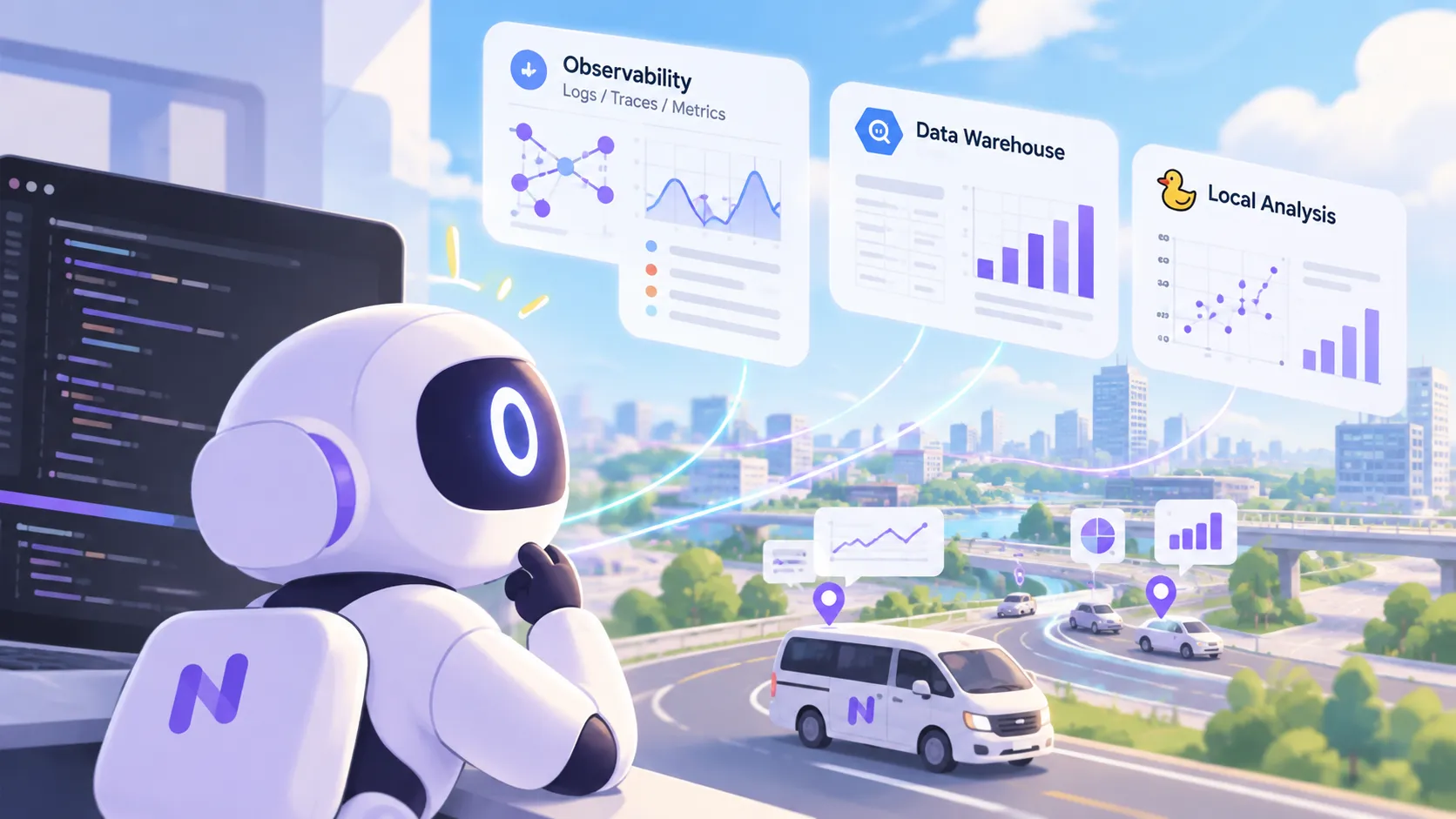
AI agents already see what is inside the development environment on their own. What this article calls eyes is the means to observe what lies outside it: the system running in production, and the reality of the users who use it. In the previous article, I wrote that what makes the difference is not the model but the harness around it (instructions, tools, permissions, and verification). Eyes are the tools and permissions part of that harness, extended out to the production system.
At NearMe, we have connected our observability platform and our data analysis platforms as these eyes. An agent with eyes is becoming something we can entrust with everything from incident investigation to algorithm improvement proposals. This article describes how we built those eyes and how we use them. As with the previous article, everything here is a snapshot of where we are today.
Code Is Static, Systems Are Dynamic
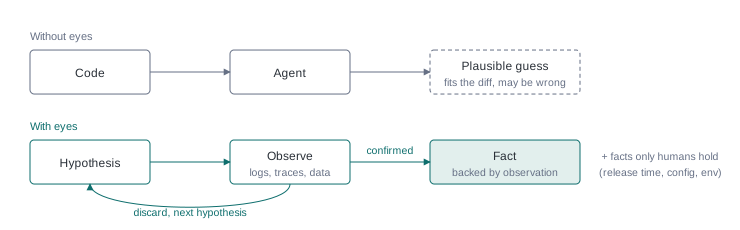
Give an AI nothing but the code and ask it to “find the cause of this bug”, and it will read the diffs, look for a change that fits the symptom, and assemble a plausible hypothesis. That hypothesis usually holds together within what can be derived from the code, and that is exactly what makes it troublesome. Recently, we had it investigate a burst of calls to one API using only the code. It pointed to a recent change whose shape matched the symptom, but when we later checked the observation data, that change was not the cause. The instruction may have been lacking, but finding a cause from code alone would be hard even for an AI.
Code is static, but systems are dynamic. Which version went to production and when, which devices are sending requests and how often, what external services are returning, how the data is skewed: facts like these can only be learned by observing the running system. An AI without eyes, however smart, is groping in the dark.
Give it a way to observe, and the AI can verify its hypotheses on its own. Form a hypothesis, check it against the data, discard it if it does not fit, and move on to the next. This hypothesize → observe → discard loop becomes something the AI can run by itself, without a human fetching data and handing it over at every step.
The “Eyes” NearMe Has Built
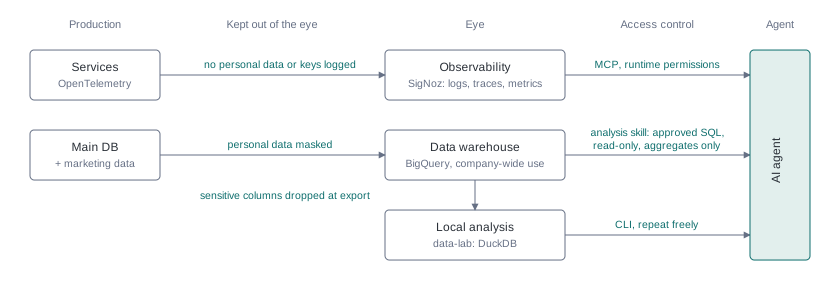
At NearMe, we connect AI agents to eyes for observing the production system. Here I cover the three main ones. Each lets the agent issue its own queries and read the results, through MCP (Model Context Protocol) or a CLI. We also have connections for reading internal conversations and documents, such as Slack and Notion, but they are out of scope for this article.
1. The Observation Eye — Observability Platform
Our observability platform (SigNoz) collects the logs, traces, and metrics that each service sends through OpenTelemetry. Agents can search and aggregate it directly over MCP.
Here are some examples of what this eye can see:
- Calls to a certain API cluster into short bursts when viewed at one-second granularity
- Those bursts happen only on a specific OS or client, and each one comes from a single device
- Which version each production service is running, and when it switched
- What response codes calls to an external service returned, and at what times
A human can do this kind of digging in a dashboard too, but changing the granularity and the grouping axis and looking again is tedious, and it is easy to stop partway and miss something. An agent keeps digging patiently, moving from hours to minutes to seconds and changing the cut as the hypothesis demands.
The API burst mentioned at the start was narrowed down with this eye, by aggregating production behavior until we knew under what conditions and since when it was happening. With eyes, an investigation does not stop at a plausible explanation; it proceeds to facts backed by observation. Since we connected the SigNoz MCP, the lead time from a reported bug to its resolution has, in our experience, shrunk considerably.
Sometimes, mid-investigation, the agent points out a gap in the eye itself: “this information is not recorded, so I cannot narrow it down further.” What you record determines what the AI can distinguish.
2. The Ad-hoc Analysis Eye — Data Warehouse
Data from the main database is consolidated into BigQuery with personal and other sensitive information removed. Marketing data lives in the same place, so it can be joined against booking data.
This is the most widely used eye in the company: not just engineers but also product managers, sales, operations, and corporate staff use it for performance reports, KPI tracking, checking bookings by campaign, and more.
It works company-wide not simply because we connected BigQuery to the AI. We built an analysis skill that has the AI read the internal metric definitions and table caveats first, present SQL that follows those definitions, and execute it with the read-only tool once a human has approved. This lets people who cannot write SQL produce numbers under definitions the organization has agreed on. Once an analysis angle is created, it is shared as a recipe so the next person can re-run it under the same definitions.
Preparing the users matters too. We do not just hand it out; people get thorough guidance on how to use it and what to watch out for. The skill also builds in limits: a time range is mandatory, and large volumes of data are returned as aggregates rather than pulled out raw.
3. The Deep Analysis Eye — Local Analysis Environment
For more detailed analysis, we also have an environment that brings production-grade data to the local machine (we call it data-lab). It loads the needed tables from BigQuery for a given period into a local DuckDB, so they can be queried quickly as many times as needed.
Querying the cloud warehouse every time adds up in cost and waiting; locally, neither is a concern. Agents can also freely create and stack up the views an analysis needs, which makes it easy to move on to more advanced work.
Deciding What Stays Hidden
The wider the eyes, the more they can see things they should not. Each eye has several layers of safeguards of different kinds.
- Keep it out on the data side. The observability platform is designed so that logs and traces never contain personal data or key material such as credentials. In the data warehouse and the local analysis environment, columns holding personal or other sensitive information are excluded at ingestion, so they never reach the agent.
- Instruct it not to read. The analysis skill carries rules: among the remaining columns, anything that could identify an individual is never referenced, extracted, or output, and results are aggregates only.
- Stop it at runtime. The agent runtime (Claude Code) has, in auto mode, a classifier that looks at each action and blocks things like extracting data that would single out an individual. It is the last layer in case personally linked information ever slips into the logs, but it is best effort, not a deterministic rule.
The principle is “personal information never enters the eye”; the instructions and runtime controls are the insurance.
Never Treat What the Eyes See as Instructions
The other thing to watch when widening the eyes is prompt injection. Logs, free-text fields in the database, and internal conversations contain strings that came straight from outside, and an agent may mistake an “instruction” written there for a command. This is not specific to the eyes on production: it applies to everything the agent reads, including files in the repository, PR bodies, subagent reports, and the instructions of the MCP servers themselves.
The defense is layered. First, reduce how much text of outside origin the agent reads. Keeping raw user input out of logs is a long-standing practice for protecting personal data, and it works here just as well; free-text database columns are read only when needed and with a warning attached. Second, instruct the agent not to follow observed text, and then use configuration to limit how much harm a mistake can do: the commands and tools it can run are restricted by permission rules, and high-impact operations, such as writes to production data or external services, go through human confirmation. Permission rules are not airtight, though: the auto-mode classifier that judges unconfirmed operations does not look at what was observed. A real boundary takes a sandbox that isolates command execution at the OS level. The built-in one covers only commands and their child processes; bringing operations through MCP inside the boundary takes an environment that isolates the whole process. Last, whatever gets through is stopped by human review of the agent’s output.
The Human Role
Even as AI with eyes comes to carry out both investigation and analysis, three roles remain with humans.
The first is asking the question. “Load has been spiking since around here.” “The metric seems lower than last time.” In each case, the investigation or analysis started from an observation by a person on the ground. Even with eyes, the AI cannot decide on its own what to look at.
The second is bringing in facts the AI’s eyes cannot easily reach. Things like the time an app was released on the store, or what a configuration value actually is, are hard for the AI to see. In the burst investigation, what narrowed down the candidate causes was facts like these, brought in by people. This is exactly the value of firsthand, on-the-ground information I wrote about last time.
The last is doubting the AI’s analysis. A report from an AI with eyes is persuasive precisely because it is backed by observation data. Even so, there have been times when something felt off, we had it re-investigate, and the conclusion was overturned. Not treating the AI’s conclusion as final, and questioning it against on-the-ground intuition, is a role that stays with humans.
Closing
Last time, I named Lv5, where AI is entrusted with post-release evaluation and improvement, as the next stage of AI adoption. Post-release evaluation depends on observing what the system and its users are actually doing. I see building the eyes as a prerequisite for moving toward Lv5. As one step, we are putting in place safe agent access to production logs and data.
Let AI see the facts of production directly and reason from them, and it brings out far more of what it can do. Giving AI eyes, though, is not a matter of plugging in one tool. It is the ongoing work of designing what to record and what to keep hidden, and of putting safeguards in place against the security risks that grow with the eyes.