Automating and Streamlining Shift Scheduling with Mathematical Optimization and AI Agents
Introduction
Hi, I’m Takuma Kakinoue, an engineer at NearMe. I’m highly motivated to solve real-world problems using advanced technologies such as mathematical optimization and machine learning. At NearMe, I mainly work on automated dispatch and ride-sharing matching systems. I’m interested not only in building systems with cutting-edge technology, but also in “designing” entire operations, including workflows.
The topic of this article is a project that recently emerged as a new internal challenge: the “Shift Scheduling Automation and Efficiency Improvement Project.” NearMe focuses on developing a platform that controls ride-sharing matching and vehicle assignment, while vehicle and driver management and actual operations are outsourced to partner hire-car companies (hereinafter referred to as “operating companies”). Driver shift scheduling was handled by the operating companies themselves, but they requested more efficient scheduling — which led us to launch this project.
In this article, I will describe the requirements of the shift optimization system, how we mapped those requirements onto a mathematical optimization framework, and an interactive shift scheduling system built with AI agents.
Requirements Gathering & Definition
After interviewing one of the operating companies, we identified the following areas for improvement in terms of shift efficiency:
- Optimize the number of drivers on duty in response to fluctuations in dispatch request volume
- Even out driver working hours and minimize the number of vehicles in use
The following constraints were also identified as being considered during manual shift scheduling.
We decided to classify constraints into hard constraints (must always be satisfied) and soft constraints (should be satisfied when possible):
- Legally mandated rest intervals between shifts (hard constraint)
- Driver vacation requests (soft constraint)
- Each driver’s number of working days must fall within the minimum and maximum working days for the month (hard constraint)
- Cap the number of drivers working per day in order to keep some vehicles in reserve (hard constraint)
- Shifts are planned on a monthly basis, but the final week of the previous month must also be taken into account (hard constraint)
The current operational workflow was as follows:
- Driver vacation preferences and desired working days are managed in CSV files
- Shifts are manually created and each driver is informed of their working days
- If a driver requests a change, the shift is manually adjusted
Shift Optimization System Design
Based on the requirements gathered above, I designed the system. My initial plan was a simple CUI application that reads configuration values from a YAML file and displays the shift optimization results on screen. The following is an overview of the system design.
Input
The following settings are specified in a YAML file:
Global settings
- Legally mandated rest intervals between shifts
- Required number of drivers per day of the week
- Weights for each term in the objective function (w1, w2, w3)
Per-driver settings
- Minimum working days
- Maximum working days
- Requested vacation days
- Work schedule for the final week of the previous month
etc.
Output
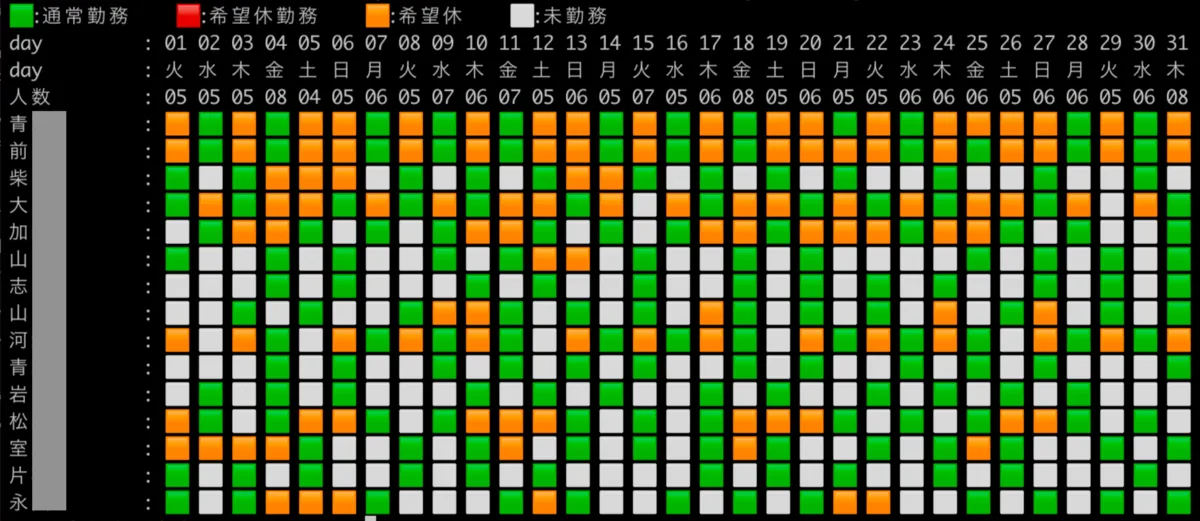
Results are displayed on screen as shown below:
- Driver names are shown on the left (only the first character of the last name is shown here)
- Each day’s shift is color-coded (green: working, orange: requested day off, white: non-requested day off)
Objective Function
w1 * [absolute deviation from desired working days] + w2 * [number of shifts where driver worked despite requesting a day off] + w3 * [vehicle utilization efficiency]
Optimization Framework
The problem is solved using a Constraint Programming SAT solver under the above objective function and various constraint functions.
This was implemented in Python and solved in approximately 10 seconds on an M1 Mac.
To give you a sense of the implementation, a simplified version of the code is shown below.
(1) Prepare employee and day information
employees = [
    Employee("Alice", 5, 10),
    Employee("Bob", 3, 8),
]
settings = Setting(target_workers_per_day=[2,2,2,2,2,2,2], max_workers_per_day=3)- Set the minimum and maximum number of shifts per week for each employee.
- Set the target and maximum number of workers per day.
(2) Create variables for whether each employee works on each day
work[e_idx, d_idx] = self.model.NewBoolVar(...)work[e, d]is a boolean variable (0 or 1) representing whether employeeeworks on dayd.
(3) Add constraints for the number of shifts per employee
emp.min_shifts <= sum(work[e_idx, d]) <= emp.max_shifts- Constrain each employee to work the desired number of shifts per week.
(4) Penalize the deviation from the target headcount per day
dev = self.model.NewIntVar(...)
self.model.AddAbsEquality(dev, actual - target)- Store the absolute difference between the actual and target headcount per day in
dev, and add it to the minimization target.
(5) Also penalize exceeding the maximum headcount per day
ex = self.model.NewIntVar(...)
self.model.Add(ex >= actual - max)- Compute the excess
exover the maximum headcount and add it as a penalty.
(6) Minimize the total penalty (objective function)
self.model.Minimize(sum(deviations) + sum(excesses))- Optimize to minimize “headcount deviation” and “exceeding the maximum.”
(7) Run the solver to find a solution
from ortools.sat.python import cp_model

solver = cp_model.CpSolver()
solver.Solve(self.model)- Solve using OR-Tools’ CP-SAT solver.
Results Comparison
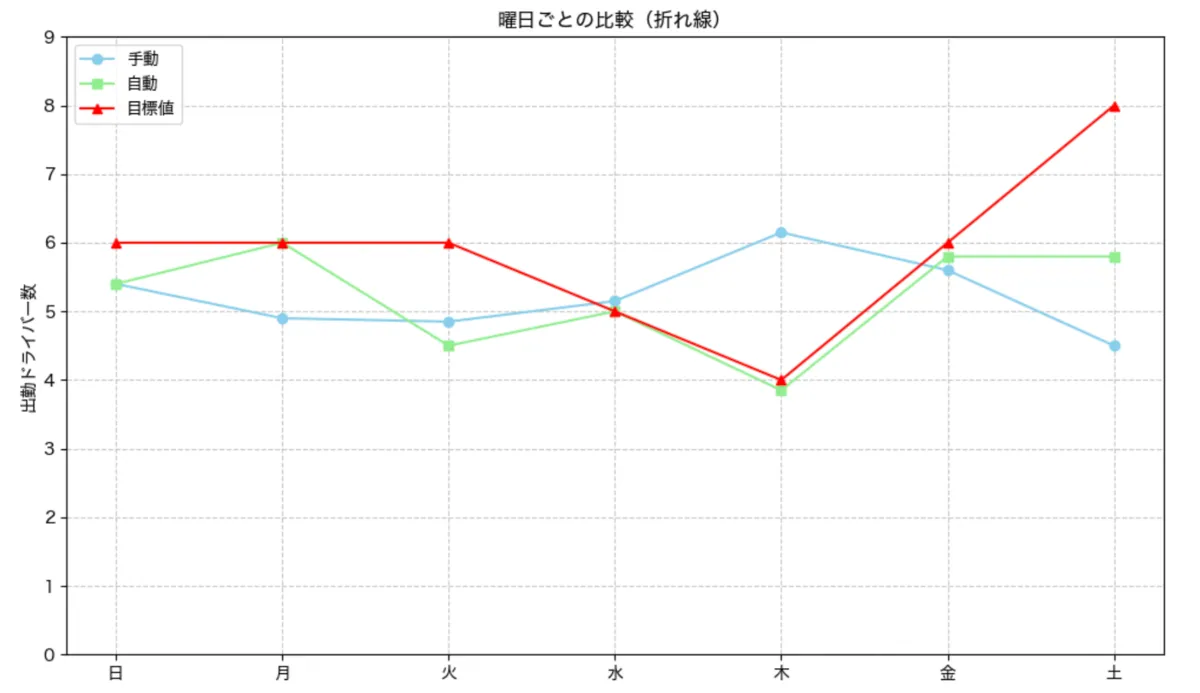
First, the shift scheduling manager at the operating company and I double-checked together to confirm that the schedule produced by the shift optimization system satisfied all constraints. We then compared the manual schedule against the system-generated schedule in terms of how closely the number of drivers on each day of the week matched demand.
Data analysis showed that Wednesdays and Thursdays tend to have fewer orders, while Saturdays tend to have more. We therefore set the following target driver counts:
- Wednesday: 5 drivers
- Thursday: 4 drivers
- Saturday: 8 drivers
- Other days: 6 drivers
The graph below shows the average number of drivers on duty per day of the week (x-axis: day of week, y-axis: average number of drivers). When shifts are scheduled by the system (automated), the deviation from the target headcount for each day is smaller compared to the manual approach.
Interactive Shift Scheduling System Using AI Agents
We are currently developing an interactive shift scheduling system. Its purpose is to flexibly incorporate additional requests such as “Please give this driver a day off on this day after all.” While an engineer could handle such requests manually, we decided to leverage AI agents to reduce the workload.
In terms of architecture, the optimization computation is handled by OR-Tools, while an AI agent generates the YAML file that contains the input information for the optimization, including the various constraints.
The AI agent is given a prompt that describes the meaning of each configuration value. We chose this design because structured data like YAML is a good fit for AI agents.
Initially, we considered a GUI with buttons and other UI elements, but we chose an AI agent as the interface for the following reasons:
- It enables flexible, natural-language responses
- Using an existing model allows for rapid development (the only UI widget needed is essentially a text box)
- The conversational format is intuitive and requires no learning curve
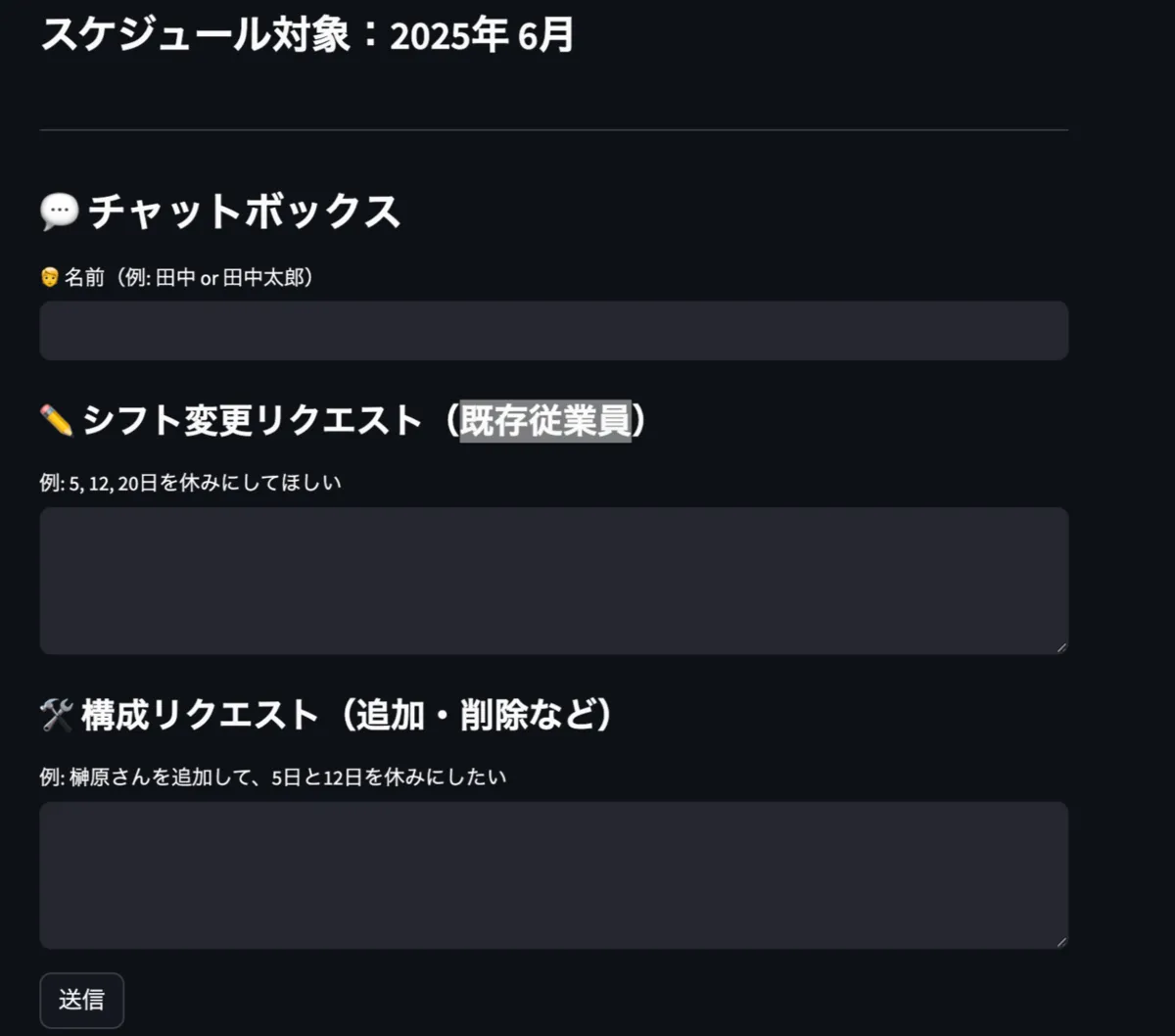
Below is the UI and prompt created by an intern for a proof-of-concept.
In practice, when you type something like “Please give Driver Sato Thursdays off,” the system overwrites the YAML configuration accordingly and re-runs the optimization to display the updated results. It is implemented as a web application using Streamlit.
The following code is a summary of the implementation for sending requests to the AI agent.
(1) Building the prompt
The prompt content is heavily abbreviated below.
def build_system_prompt(year, month):
    return f"""
You are an AI that generates a diff JSON for updating a YAML file based on a natural language description of employee shift preferences for {month}/{year}.

# 🛠 Update Notation
Output the target employee name and the update content in JSON format as shown in the example below.

# 🧾 Input Example
"Make all of Tanaka's Wednesdays preferred days off (example for July 2025)"

# 📤 Output Example
{{
  "diff_type": "update",
  "name": "Tanaka",
  "updates": {{
    "preferred_days_off": {{
      "add": [2, 9, 16, 23, 30]  // e.g., Wednesdays in July 2025
    }}
  }}
}}

""".strip()- Instructs the AI to output how to update the YAML file that describes each optimization setting.
(2) Initialize the Azure OpenAI client
client = AzureOpenAI(
     api_key=os.getenv("AI_AGENT_AZURE_OPEN_AI_API_KEY"),
     api_version=os.getenv("AI_AGENT_AZURE_OPEN_AI_API_VERSION"),
     azure_endpoint=os.getenv("AI_AGENT_AZURE_OPEN_AI_ENDPOINT", ""),
)- Loads the API key, endpoint, and other values from environment variables.
(3) Build the input messages for the chat AI
messages=[
       {"role": "system", "content": build_system_prompt(year, month)},
       {"role": "user", "content": chat_input},
]- The messages consist of two parts: the prompt created in (1) as
"system"and the text entered by the user as"user".
(4) Send the request to the Azure OpenAI client
response = client.chat.completions.create(
      model=os.getenv("AI_AGENT_AZURE_OPEN_AI_DEPLOYMENT_NAME"),
      messages=messages,
      temperature=0.0,
      max_tokens=1000,
      top_p=1.0,
      frequency_penalty=0.0,
      presence_penalty=0.0,
      stop=None,
 )
return json.loads(response.choices[0].message.content.strip())- Sends the prompt + chat content to the AI agent.
- The AI agent returns information about which values in the YAML (containing the optimization inputs) should be changed to satisfy the request, and the YAML is overwritten accordingly.
Future Outlook
The shift optimization system has been developed with day-level optimization in mind, but we are also working on a system that optimizes at the hour level as a further development.
For the AI agent-based system, we are considering the following directions:
- Developing a feature that generates multiple configuration patterns for a given request and proposes multiple shift scheduling options
- Developing a feature that can infer intent even from ambiguous instructions from a mathematical optimization perspective, and produce output that aligns as closely as possible with the request
- Developing a fast algorithm for hour-level (rather than day-level) optimization
- A feature that identifies which constraints are most frequently violated (i.e., causing solutions to be rejected) and assists with tuning configuration values
- Improving employee name recognition accuracy (the system sometimes misidentifies words unrelated to names as employee names)
Closing
In this article, I described the “Shift Scheduling Automation and Efficiency Improvement Project.”
In the context of digital transformation, I believe that not only do engineers need to understand the business being transformed, but having people on the operational side who understand software makes the system development process go much more smoothly. NearMe’s operations team includes people with engineering experience and a deep understanding of system development, and I feel that I was able to smoothly carry out the entire development process — from requirements gathering, requirements definition, system design, implementation, to verification — thanks to the support of the operations team.
I believe NearMe is an ideal environment for engineers who are interested not just in keeping technology at the research stage, but in applying it to real-world business operations!
Finally, NearMe is hiring engineers! If you’re interested, please check out the link below.
Author: Takuma Kakinoue