Dramatically Reducing Dispatching Workload: Developing 'Vehicle Slots' for Hourly Schedule Management
Introduction
Hi, I’m Kaito Asahi, an engineer at NearMe.
NearMe provides a shared ride service. Our platform efficiently combines multiple customer reservations so that a single vehicle can serve multiple destinations — a feature we call “shared dispatching.” My main role at NearMe involves developing and improving new features for our application, with a particular focus on the management dashboard used by transport operators and our internal team.
At NearMe, we have a process of assigning customer reservations to a specific driver-vehicle pair, which we call “dispatching.” As described in the tech blog post below, many of these assignments are now handled automatically through our auto-dispatch system.
I was responsible for developing improvements around this dispatching workflow, including addressing some pain points that had been identified within it.
This article first outlines the challenges in dispatching and additional issues that surfaced during development, then summarizes the impact of the new feature.
Background / Challenges
Originally Identified Challenges
The development of the feature introduced in this post was motivated by the following operational challenges faced by transport operators.
Challenge 1: Manual Monitoring Late into the Night
Some operators were refreshing the management dashboard every few minutes, even late at night, searching for suitable incoming orders. This led to the following problems:
- Excessive working hours for operators
- Risk of human error
- Missed opportunities (dispatching windows slipping by)
Challenges That Emerged During Development
We initially set out to solve the above problems, but as development progressed, the following additional challenges came to light.
Challenge 2: Coarse-Grained Schedule Management
The existing operating hours configuration was based on repeating day-of-week patterns.
- Example of the old configuration
- Vehicle A
- Every Monday: available 8:00–17:00
- Every Tuesday: available 8:00–12:00
- Vehicle A
This approach had the following issues:
- No way to adjust for a specific day only
- Example: “I want to run in the afternoon this coming Monday only” → required changing the vehicle settings and reverting them the following week
- Difficult to handle irregular operating patterns such as events or pilot programs
- Risk from configuration changes
- Changing the settings would affect future reservations
- Risk of making previously dispatchable reservations undispatchable
Challenge 3: Difficulty Managing Per-Driver Schedules
The existing system was primarily based on vehicle availability, which caused the following issues:
- Insufficient consideration of individual driver schedules
- Difficulty handling complex shift patterns
Challenge 4: High Overhead for Creating Block Slots
Previously, when operators needed to prevent reservations from being assigned during a certain period, they would create dummy reservations (hereafter referred to as block slots) and assign them to a specific driver and vehicle. This led to:
- High creation overhead
- The process followed the same order creation flow as real reservations, making it time-consuming
- Poor visibility (difficult to distinguish from actual reservations)
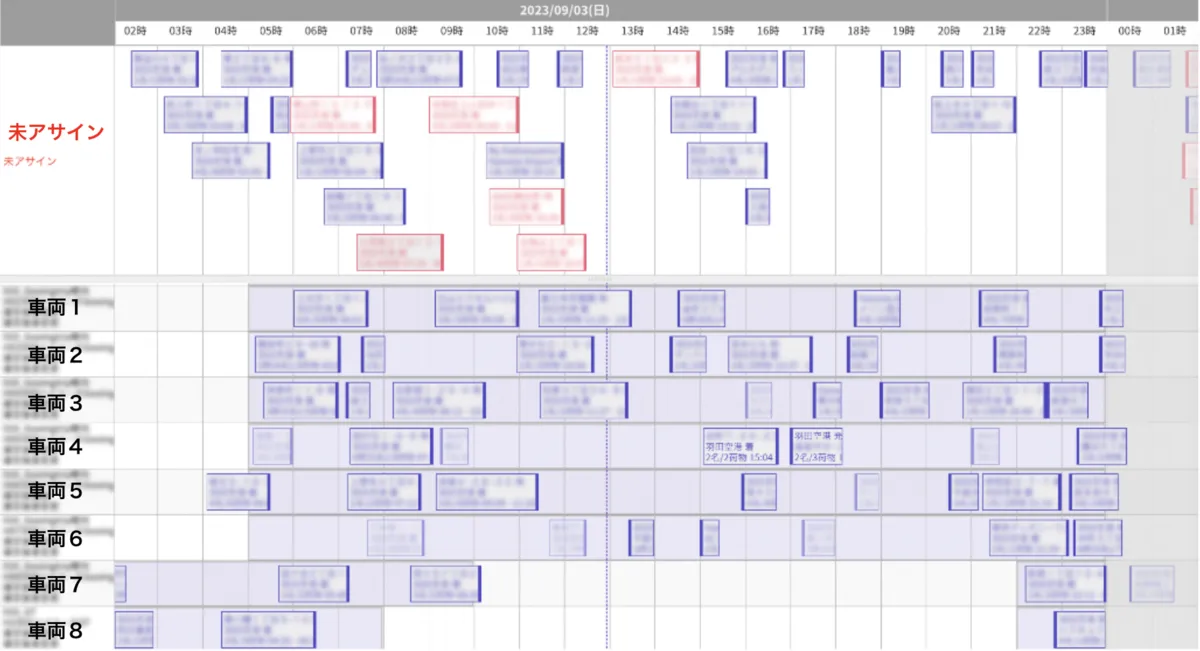
In light of these challenges, it became clear that flexible, hour-granularity schedule management was even more important than originally anticipated. The management dashboard already included a calendar view like the one shown below, and the goal was to make it easy and flexible to configure which vehicle each incoming reservation should be dispatched to.
About the Feature We Developed
Overview
We call the feature developed for this project “vehicle slots.” It primarily supports two types of slots, each providing fine-grained control over which services to dispatch to and which to block.
OPERATABLE
- Explicitly marks a time window as available for dispatching
- Can be restricted to reservations for a specific service
- Enables proactive schedule management: “Accept reservations for this service during this time window”
BLOCK
- Explicitly marks a time window as unavailable for dispatching
- Used for driver breaks, maintenance windows, etc.
- Provides explicit control: “Do not accept reservations during this time window”
Here is what a schedule looks like after configuring vehicle slots:
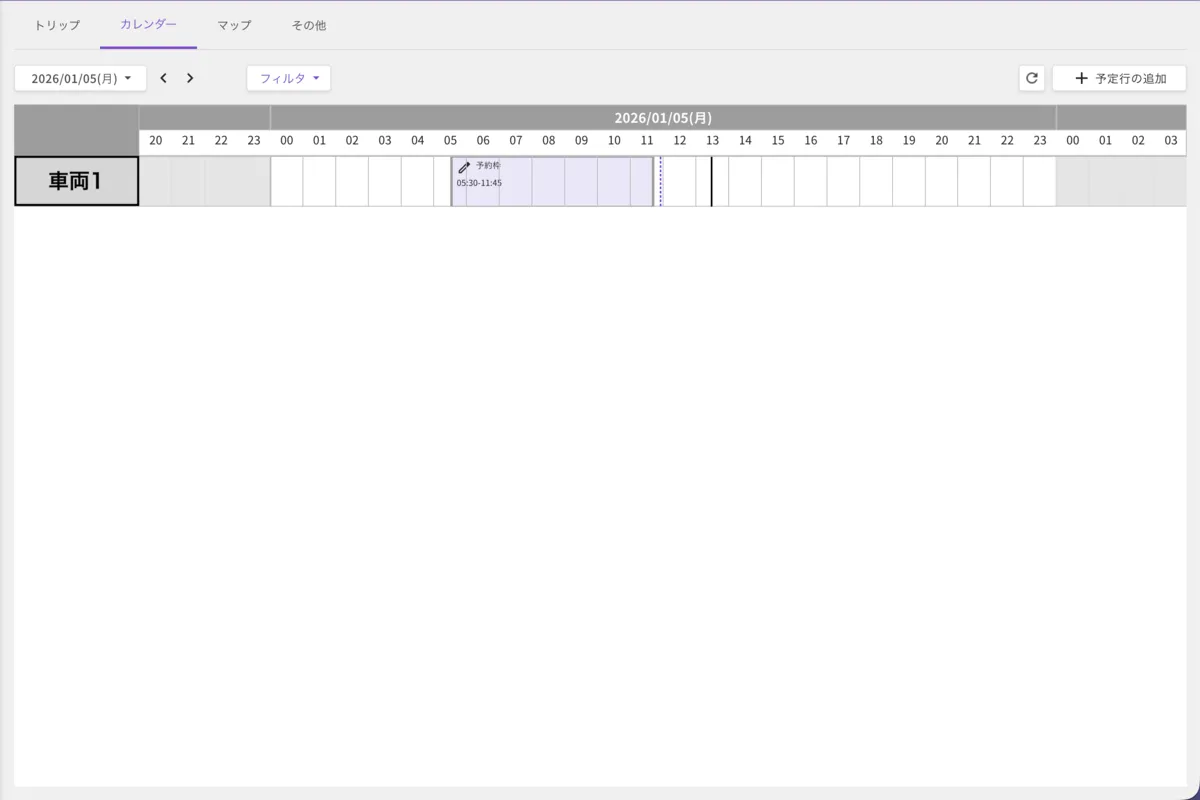
The “vehicle slots” shown in the image are part of the feature we built. The auto-dispatch system automatically assigns reservations that meet the configured conditions into these slots. The detailed acceptance conditions can be flexibly adjusted in the settings.
On the UI/UX side, we added the following interactions:
- Long-press on the calendar for 0.5 seconds or more
- Drag left or right while holding
- Release to create the vehicle slot
Here is a demonstration of the interaction:

For cases where you simply want to quickly create a one-hour slot, you can also double-click (or double-tap) to create it.
While this may look like a simple addition, implementing these interactions within the existing calendar component required careful attention to the following:
- Touch event handling for both PC and smartphones
- Time calculation based on the calendar’s zoom level
- Avoiding conflicts with existing drag-and-drop functionality
On touch-based devices like smartphones, the slot creation gesture can conflict with calendar scrolling, so we designed the interaction so that vehicle slots can be created via double-tap.
Evolution of Dispatch Control: Flexible Schedule Management with Vehicle Slots
The vehicle slot feature addresses the four challenges described above as follows.
Solution 1: Freedom from Late-Night Manual Monitoring (addressing Challenge 1)
Recap of the challenge
Operators were refreshing the management dashboard every few minutes to find suitable orders, continuing late into the night.
How vehicle slots solve it
By setting up vehicle slots in advance, reservations are automatically dispatched into those slots.
Change in the dispatch flow
- Before
- Reservation comes in → Operator manually reviews → Dispatching decision
- With vehicle slots
- Vehicle slots configured in advance → Reservation comes in → Auto-dispatched into the slot
Impact
- Operators no longer need to monitor the dashboard continuously
- Late-night workload significantly reduced
- Risk of missed dispatching opportunities decreased
Solution 2: Flexible Daily and Hourly Schedule Configuration (addressing Challenge 2)
Recap of the challenge
The existing operating hours were based on repeating day-of-week patterns, making it difficult to adjust for a specific day such as “just this coming Monday.”
How vehicle slots solve it
- Old operating hours
- “Every Monday 8:00–12:00” (recurring day-of-week pattern) → Same pattern runs every week
- Vehicle slots
- “January 10, 2026, 8:00–12:00” (specific date and time) → Different schedules can be set for each individual day
The old day-of-week operating hours were not removed; vehicle slots coexist with them.
Example
- [Base pattern] Operating hours: Monday 8:00–17:00
- [Event week] Vehicle slot: Extend 1/10 (Mon) to 8:00–20:00
- [Following week] Automatically reverts to the base pattern (8:00–17:00)
Impact
- “Change only this one day” is now easy without modifying vehicle settings
- Flexible handling of irregular operating patterns such as events or pilot programs
- Eliminates the risk of configuration changes affecting future reservations
Solution 3: Per-Driver Schedule Management (addressing Challenge 3)
Recap of the challenge
The existing system was primarily based on vehicle availability, with insufficient consideration of individual driver schedules.
How vehicle slots solve it
Vehicle slots can be configured for a specific vehicle-driver combination. Selecting a vehicle is required; the driver is optional. The calendar timeline is also displayed in units of these combinations.
Example use cases
-
Shared vehicle operation
- Vehicle A × Driver B row: Morning (8:00–12:00): OPERATABLE slot
- Vehicle A × Driver C row: Afternoon (14:00–18:00): OPERATABLE slot
→ One vehicle shared by multiple drivers across different time slots → Each combination is displayed as a separate row on the calendar, making it easy to read at a glance
-
Managing driver break times
- Vehicle A × Driver B row: 12:00–13:00: BLOCK slot (displayed as “Block”)
→ No reservations dispatched during this period, securing Driver B’s break time
Impact
- Fine-grained per-driver schedule configuration is now possible
- Complex shift patterns can be accommodated
- A single vehicle can be efficiently shared among multiple drivers
Solution 4: Easy Creation of Block Slots (addressing Challenge 4)
Recap of the challenge
Previously, blocking dispatching required creating dummy reservations, which was time-consuming and hard to distinguish visually from real reservations.
How vehicle slots solve it
Time windows where dispatching should be blocked can now be configured as dedicated BLOCK slots.
Old approach
Create a dummy reservation → Uses the same order creation flow as real reservations, so it’s time-consuming → Hard to tell apart from actual reservations, risking accidental operations → Large numbers of dummy reservations had to be created at the start of each month
BLOCK slot feature
Create easily with drag-and-drop → Displayed explicitly as “Block” → Clearly distinguished from regular reservations → Simple to create and delete
Operator feedback
- “Month-start setup is dramatically faster”
- “Much easier to read”
Impact
- Dramatically reduced overhead for creating block slots
- Improved visibility, reducing risk of accidental operations
- Significant reduction in workload for start-of-month setup
These solutions together enable flexible handling of complex driver shift patterns while achieving efficient continuous operations.
Future Possibilities for Vehicle Slots
AI Agents
The vehicle slot feature developed here will be integrated with the shift scheduling feature recently published on our tech blog:
By automatically converting AI agent-determined shift schedules into vehicle slots and reflecting them on the management dashboard calendar, we can achieve a seamless flow from a generative AI conversation all the way to dispatching control.
Currently, this shift scheduling runs as an independent system deployed separately, but we plan to integrate it into the existing management dashboard so that everything can be managed in one place.
Closing
This post covered the “vehicle slot” feature we developed.
In building this feature, we received invaluable testing and feedback from our PdM and the operations team, which brought it to completion.
We see this feature as still in its early stages, and believe there is plenty of room for further operational improvements ahead.
Finally, NearMe is hiring engineers! If you’re interested, please check out the link below.