Building CI with Argo
Introduction
In this article, I will explain NearMe’s CI architecture. CI stands for Continuous Integration, a practice that automatically runs builds and tests whenever code changes are made (reference).
At NearMe, we implemented CI using Argo running on Kubernetes (k8s). Kubernetes is an open-source system for managing containerized applications. Argo is a set of tools that enables CI and CD (Continuous Delivery) on Kubernetes. It is common to rely on external services for CI, but we wanted to manage CI without depending on outages or pricing changes in third-party systems. Since our infrastructure was already centered on Kubernetes, we chose to build it ourselves, even though it added some complexity.
System architecture
The CI system consists of Argo Events for event handling and Argo Workflows for job execution. The overall architecture is shown below.
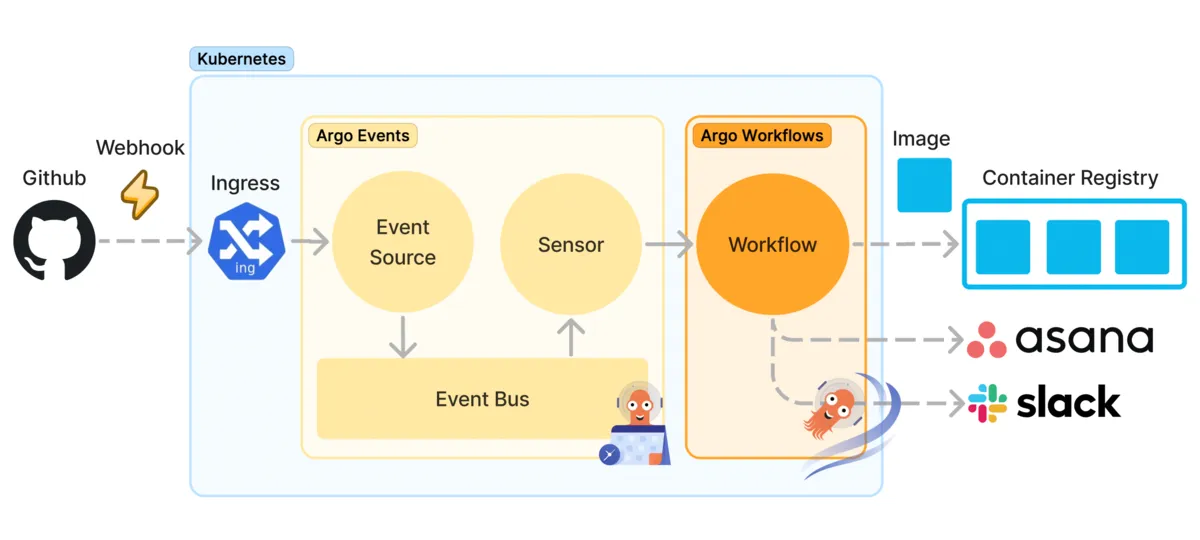
Both Argo Events and Argo Workflows provide Kubernetes custom resources, making it easy to define resources on Kubernetes. However, because NearMe operates multiple repositories in a microservices architecture, we had many parts we wanted to standardize across repositories. So we manage these definitions programmatically using cdk8s.
Argo Events
Argo Events is designed to handle many different types of events in a generic way.
In NearMe’s CI, we handle GitHub webhook events. This is implemented with the EventSource custom resource. The following is an example definition.
kind: EventSource
metadata:
  name: github-event-source
spec:
  github:
    rideServicePullRequest:
      events:
        - pull_request
      repositories:
        - names:
            - ride-service
          owner: nearme-jp
      webhook:
        endpoint: /ride-service/pull_request
      ...
This resource detects pull request events for the ride-service repository at the /ride-service/pull_request endpoint.
To accept requests from outside the cluster, the host for this endpoint is defined via Kubernetes Ingress. Requests from GitHub are then forwarded to EventSource through Ingress.
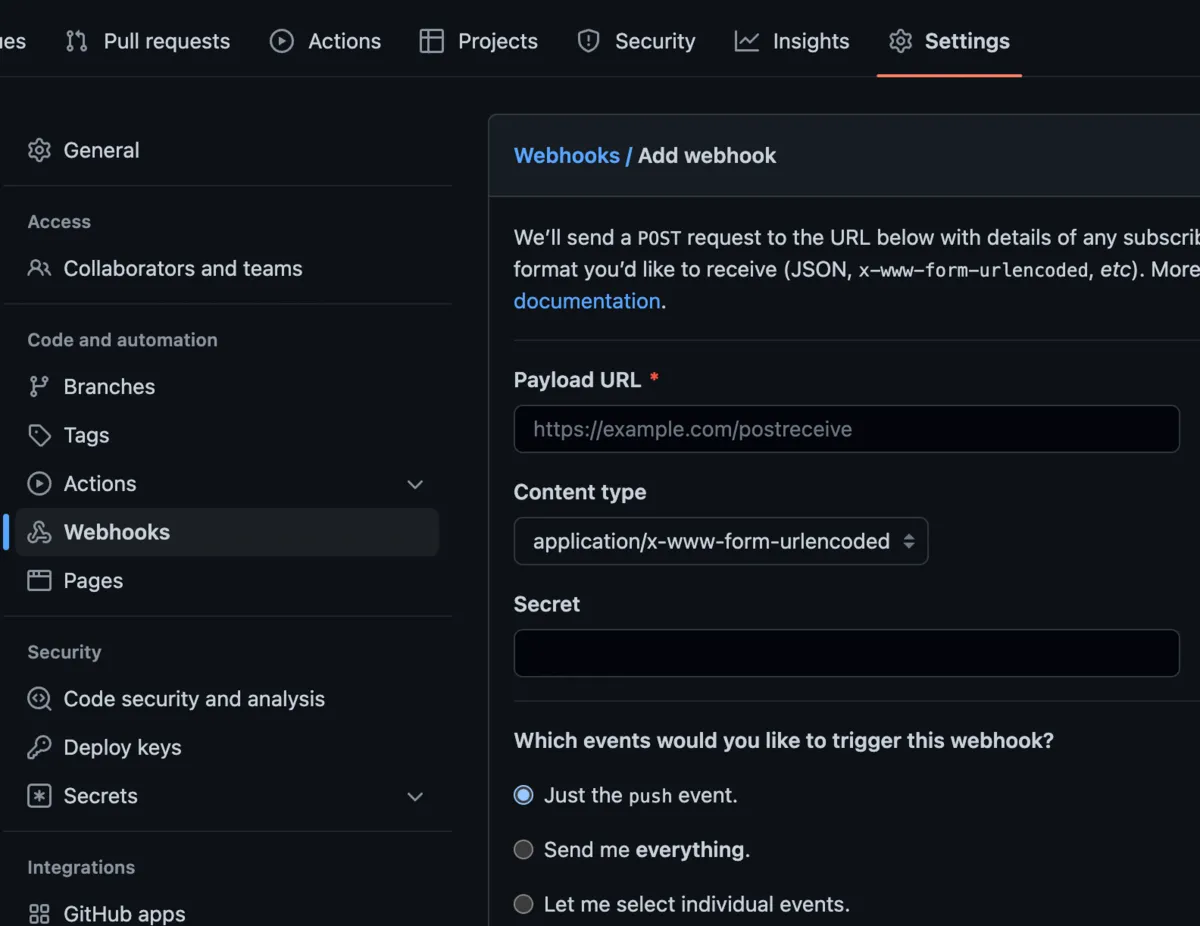
You configure this endpoint URL in GitHub repository Settings > Webhooks. At the same time, you also select which event types to send, such as pull request and push events.
Events received by EventSource are passed to a Sensor. A Sensor subscribes to specific events and triggers specific processing. Communication between them uses EventBus with a pub/sub messaging model.
Sensor is defined as a custom resource like this.
kind: Sensor
spec:
  dependencies:
    - eventName: rideServicePullRequest
      eventSourceName: github-event-source
      name: ride-service-merged-dep
      filters:
        name: data-filter
        data:
          - path: body.action
            type: string
            value:
              - closed
          - path: body.pull_request.merged
            type: bool
            value:
              - "true"
          - path: body.pull_request.base.ref
            type: string
            value:
              - main
  triggers:
    - template:
        conditions: ride-service-merged-dep
        k8s:
          resource: workflows
          parameters:
            - dest: spec.arguments.parameters.0.value
              src:
                dataKey: body.repository.name
                dependencyName: ride-service-merged-dep
          source:
            resource:
              kind: Workflow
              arguments:
                  parameters:
                    - name: repository_name
              ...
This resource triggers the workflow described later when a pull request is merged into the main branch of the ride-service repository.
At that time, the repository name stored at body.repository.name in the GitHub event payload is passed to the workflow.
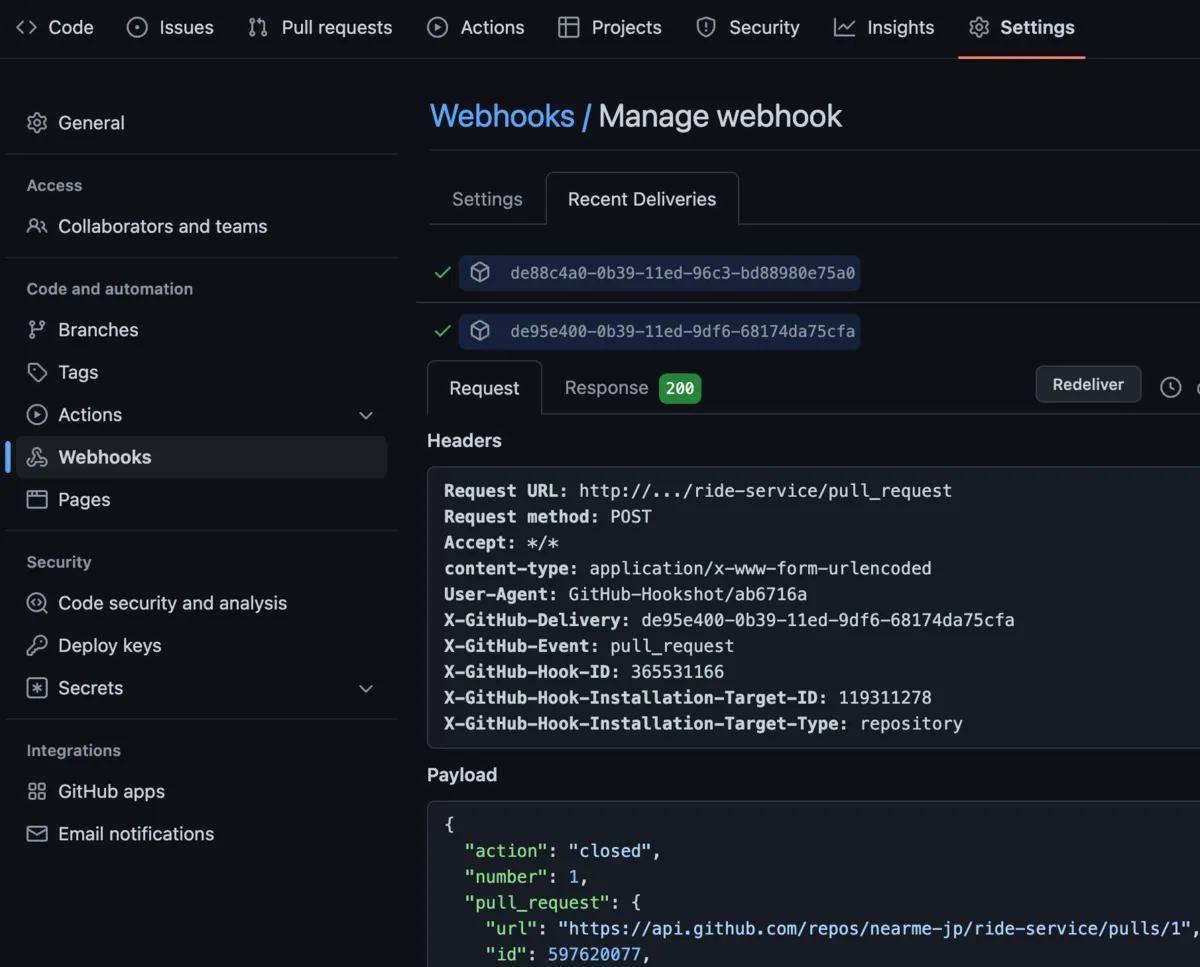
In this way, the workflow can use data such as repository name, branch name, comments, and labels from pull requests (see details here).
You can inspect payload contents in the “Recent Deliveries” tab of GitHub webhook settings. The “Redeliver” button is convenient for debugging because it resends the same event. However, jobs for a workflow event cannot be re-triggered by exactly the same event, so you need to clear the job execution history when debugging.
Argo Workflows
In NearMe’s CI, events processed by Argo Events trigger a job flow (workflow) in Argo Workflows.
This workflow runs builds and tests, and if everything succeeds, it pushes the built image to a container registry. It also sends notifications to Slack and updates task status in Asana.
The diagram below shows the internal flow of this workflow.
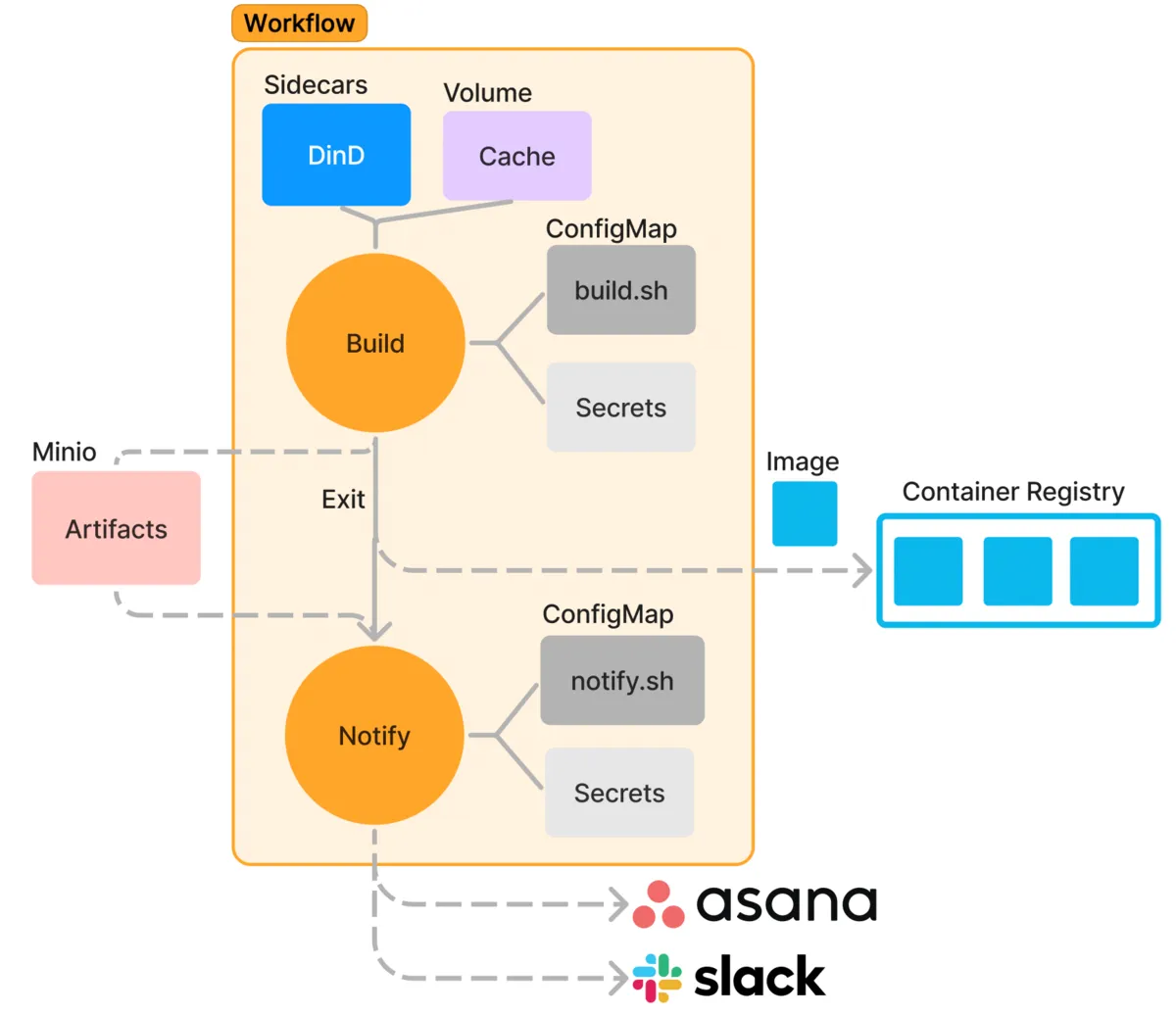
Inside the workflow, we define build tasks and notification tasks that are triggered via hooks when those tasks finish.
Task logic is written as commands run in Kubernetes containers. While it is possible to write everything inline as commands, the volume became large, so we extracted logic into shell scripts, stored them in Kubernetes ConfigMaps, and executed them from there. If things become more complex, we may rewrite parts in other languages. External CI services may let you write this part more concisely, but we found this approach can achieve the same results with manageable effort.
A workflow can also be executed independently. That is useful for debugging and for manual operation when there is trouble in event-driven components.
Build tasks
In build tasks, we first check out the repository using the repository name and branch name passed as workflow arguments. To access GitHub, we retrieve a private key from Kubernetes Secrets.
Then we build container images. To use Docker commands, we run a Docker-in-Docker (dind) container as a Kubernetes sidecar.
Tests are also run mainly via Docker commands. At this stage, we also start dependent services needed for tests, such as MySQL. NearMe’s architecture also has the Ride Service using the Routing Service, so we spin up the Routing Service during Ride Service tests as needed.
Finally, we push built images to a container registry (AWS ECR).
We also use docker save and docker load to cache Docker images and avoid downloading them every time. This cache is stored in a Kubernetes Volume.
Because build and test times can be long for some repositories, we also allow selective manual shortening. Specifically, we can skip builds based on pull request labels, or detect files changed since branch creation and run only tests directly related to those files.
To include test error logs in notifications, we save shell script execution logs to files so that later notification tasks can use them. This is implemented with Argo Workflows Artifacts. For the artifact backend, we use MinIO, which is S3-compatible.
Notification tasks
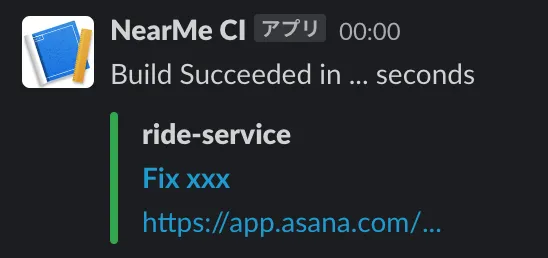
Notification tasks receive the result of the build task and post information such as pull request title, commit links, and build duration to Slack. If there is a build error, they also fetch logs from the artifacts described above (with proper escaping) and include them in the Slack message.
In addition, we extract Asana task URLs pasted in pull request comments and update task status through the Asana API. Those links are also included in the Slack message.
Conclusion
This article introduced NearMe’s CI architecture built with Argo on Kubernetes. I explained how GitHub webhook events trigger Argo Workflows through Argo Events, and shared practical ideas used in build and notification tasks. There is a learning curve because Kubernetes knowledge is required to some extent, but once you pass that point, you can implement most things you want in CI. Argo itself is highly flexible, and there are still parts we have not fully utilized, so we hope to keep evolving our development process.
Finally, NearMe is hiring engineers. If you are interested, please check the link below.
Author: Kenji Hosoda